Monday, July 11, 2016

Smart Auto Typer and Talker

Automate your typing process by creating dedicated shortcuts for the phrases or sentences you are using very frequently with this app.

Irrespective of how fast and accurate you write, there is always room for improvement. In case you want to increase your productivity in the office and get daunting tasks completed in no time, then you should consider an automation tool.

As the name suggests, Smart Auto Typer and Talker is a utility designed to lend you a hand with the typing activities you need to perform on a regular basis.


Simple setup and intuitive interface
Even though it is not overly complicated, the setup entails decompressing the archive and then following the instruction to install the app on your computer. Upon launch, you are welcomed by a minimalistic and clean UI, but that is suitable given the role of the application.
The interface consists of a window that displays the list of shortcuts you created for automating typing or tasks that require talking. In addition to the actual text, you can preview the shortcut, time interval and whether the action is designed for talking or typing from the main window.


Comes with a talker function. but does not let you customize shortcuts
You can create macros or delete the ones you no longer need by accessing the Add or Delete button from the lower area of the UI. You can create a new macro by typing in the desired text and specifying a few details. You should know that the app allows you to use the talker to speak the text, an option that can come in handy when working with videos.
On the other hand, you should know that the app enforces you to use the Control and any other key of your choice to create the macros. It would have been nice if you could set your own hotkey combination so that you can learn the shortcuts faster and be more productive. This is especially important since the app does not come with a Suspend Hotkeys function.
A handy app for automating typing routine tasks
In the eventuality that your line of work entails typing identical information within documents, templates or forms you are managing, then Smart Auto Typer and Talker is a tool that can help you automate and finish tedious activities in no time.

Visit our website:

Save time with Dose for Excel Add-In

“The most popular add-in for Excel users”

Dose for Excel is a powerful, feature-rich add-in for Microsoft Excel, which allows you to quickly perform functions that would otherwise take up much time. The tool integrates with excel and allows you to easily access its features from the command ribbon.

The advantages brought by Dose for Excel are simple and very handy especially for users who often work with Excel. Some features are new to Excel while others are greatly simplified.


The tool is easy to use since it is user friendly, each function or feature has description or (how to use) inside the tool.


Furthermore, you can check all Dose for Excel features here at website with full description and video tutorials.

“A must have for anyone who spends time in Excel”

Worldwide 50,000+ users and 1,200+ organizations use Dosefor Excel.
We truly believe that Dose for Excel is a must in every office. It's guaranteed that more than a few of the tools will be just what you've been looking for to fill the gaps in Excel.


Large collection of Excel editing functions

The advantages brought by Dose for Excel to the spreadsheet editor are simple and very handy especially for users who often work with Excel. Some features are new to Excel while others are greatly simplified.


You can delete custom rows with one mouse click, for instance entire empty lines, rows that contain at least one empty cell or duplicates. Moreover, the tool allows you to remove lines that contain a specific value. The functions are available for current sheet, for the selected sheets or the entire workbook.


The Clear Spaces option allows you to remove leading, trailing, extra spaces or all fields in the sheet.

Cell management made easy

Dose for Excel allows you to merge or split the selected cells, as well as add a background color to each field. The tool also includes data filters, a date picker, as well as a row-to-column converter.


You can easily customize the size of the work area, as well as add or edit comments with the help of the dedicated assistant. For instance, you can display only the comments for the selected cells, display only symbols of the comments or convert them into cells. An additional function is the case changer that allows you to switch words to upper/lower or proper case.


Create backups with one mouse click

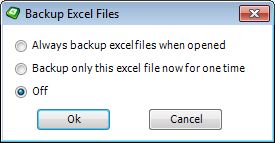
Dose for Excel allows you to generate backups with the help of the dedicated function. You can set the tool to automatically backup the data each time you close Excel, or only on demand. The add-in integrates with Excel and creates an individual section in the command ribbon. Moreover, its ease of use makes it convenient for any user.


Visit our website: